Using the Perfusion diagram
Click on a few adjacent sections of the diagram. Note the error is now present.
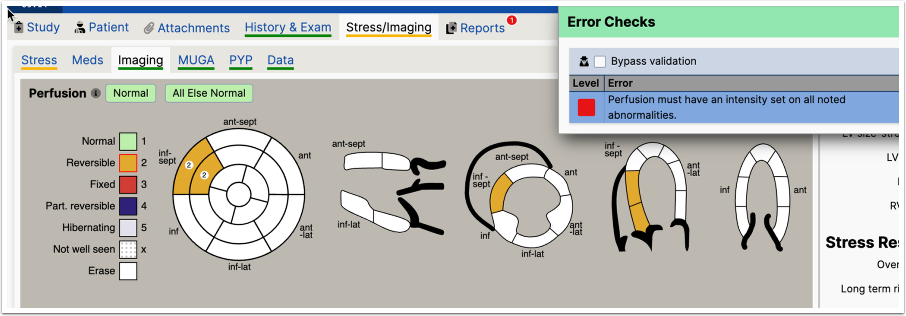
The report will now contain:
Perfusion imaging: There is a small reversible perfusion abnormality of the inferoseptal wall from the base to the mid wall.
The sentence combines the two walls into one sentence. Right click on the group in the diagram (not an individual segment) and choose an intensity. You can repeat the operation to also add a "Consistent with" phrase that can be added, although it is not required.
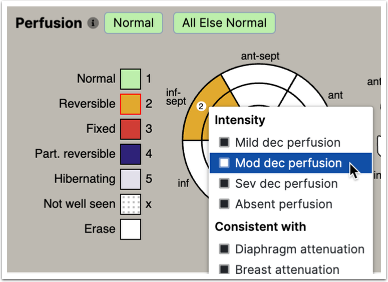
The report now contains:
Perfusion imaging: There is a small reversible perfusion abnormality of moderate intensity of the inferoseptal wall from the base to the mid wall.
Let's add another reversible defect of the anterior wall, but the whole anterior wall
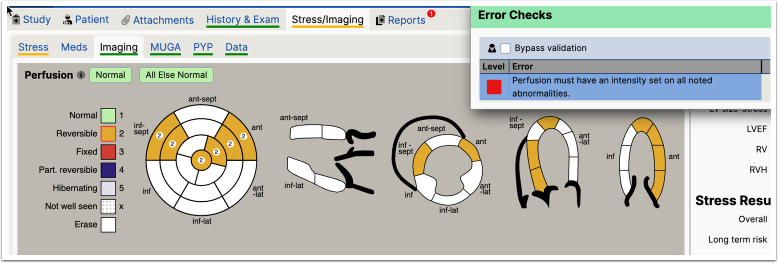
The error has returned because a new wall has been added. The report now contains:
Perfusion imaging: There is a medium sized reversible perfusion abnormality of the anterior wall from the base to the apical cap. There is a small reversible perfusion abnormality of moderate intensity of the inferoseptal wall from the base to the mid wall.
To clear the error, again right click on the group to clear the error.
Once cleared, now add an anteroseptal reversible defect.
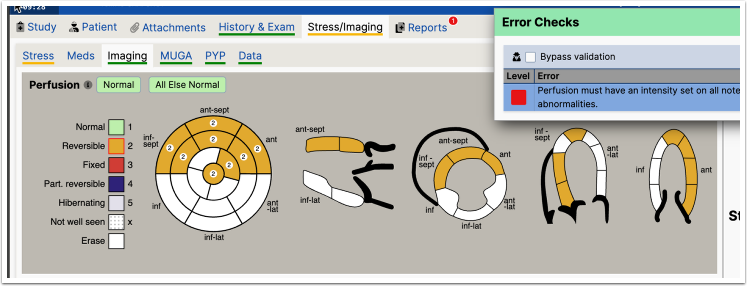
Because the diagram was updated and the groups were joined, the intensity will need to be reset. The sentence construction changes to:
Perfusion imaging: There are large reversible perfusion abnormalities of the anterior and anteroseptal walls from the base to the apical cap. There is a small reversible perfusion abnormality of moderate intensity of the inferoseptal wall from the base to the mid wall.
The user has to click again to re-establish intensity on the now combined group.