Log in Review
- Where to access EncaptureMD
- How do I login to EncaptureMD
- Two Factor Authentication
- What if I forget my password
- How do I reset my password
Sections to Review
Top Toolbar
- Company Name
- Username
- LocalProxy connection confirmation
- Avatar
- Name
- Account
- Phone Number (Adding a phone number allows tickets submitted fromcontextual helpto automatically populate your phone number. It also allows your phone number to be listed next to your name in thestaff listfor a study.)
- Change Password
- Avatar set up
- Viewer settings
- Preferences
- Show tooltips (Allowing text to show up when you hover over a DED field)
- Theme (Operating settings, Light Mode, Dark Mode)
- Signature
- Help Section
- Vertical Ellipsis-This feature allows the user to expand to full screen at any time. It also allows the user to search when inside a study.
- Log out

Left Toolbar
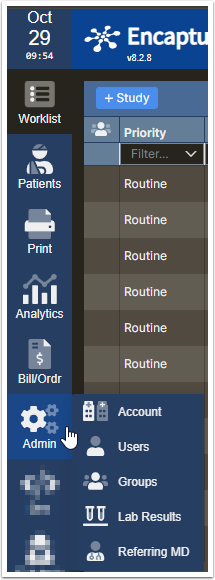
- Admin Section
- Account
- Users
- Groups
- Lab Results
- Referring MD
- Bill/Order
- Analytics
- Fax
- Patients
- Worklist