What you will accomplish: Merge two studies in EncaptureMD and prevent duplicate studies.
What Is Study Merging?
Study merging is the process of combining two or more records of the same patient study into a single, unified entry. This is important in healthcare systems where duplicate records can occur due to manual data entry or integration issues. Merging ensures that patient records are accurate and complete, and that information remains consistent across different healthcare information systems.
- Study merging unifies duplicate records for the same patient study.
- It is essential for maintaining data accuracy and consistency.
Background
Healthcare environments often use electronic medical records (EMR) or hospital information systems (HIS) that interface with imaging and reporting platforms such as EncaptureMD. Studies may be created either automatically or manually. When systems do not use a DICOM modality work list, or when patient or study information is entered incorrectly, duplicate or mismatched study records can result.
- Manual creation of studies is a frequent source of duplicate records.
- Incorrect demographic or study details can prevent proper record matching.
Key Terms
EMR/HIS: Electronic Medical Record or Hospital Information System, which manages patient and order data.
DICOM Modality Work List: A standard that helps synchronize patient and study information between imaging devices and information systems.
EncaptureMD: A platform used for managing and reporting medical imaging studies.
- Familiarity with these terms clarifies why mismatches and duplicate studies can occur.
Why It Matters
Duplicate studies can prevent finalized reports from being properly linked to the original order in the EMR, leading to failures in sending results and disrupting clinical workflows. Merging studies consolidates information, ensuring accurate communication between systems and supporting effective patient care and record-keeping.
- Merging studies prevents reporting errors and communication failures.
- It is vital for accurate patient care and reliable records.
Common Scenarios for Study Merging
Study merging is typically needed in the following situations:
- Duplicate studies are created through manual entry.
- Incorrect patient or study information results in multiple entries.
- Studies are created without an associated order and later need to be merged.
- Recognizing these scenarios helps identify when merging is necessary.
Requirements to Merge Studies
- Both studies must belong to the same patient (fix info if needed).
- Studies must be the same type.
- Neither study can be canceled.
How to Merge Two Studies
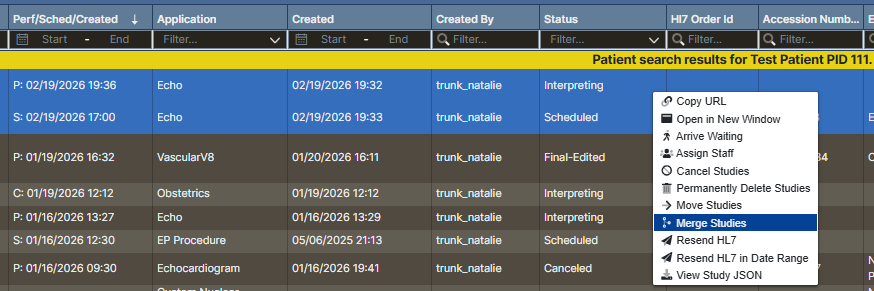
- Select the first study from the work list.
- Control-click (PC) or Command-click (Mac) the second study.
Right-click and choose Merge Studies.
- Review the Merge Preview window.
- The left panel displays the Merge Preview (1) of the study based on the current selections
- Study A (2) scheduled from an order
- Study B (3) interpreting created manually
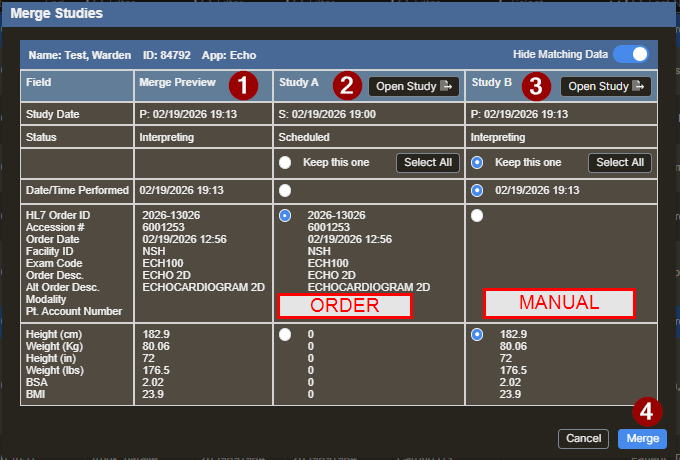
- Adjust merge options if needed (use radio buttons).
- Click Merge (4) to complete when all of the data in the Merge Preview appears correct.

Preventing Duplicate Studies
- Provide additional sonographer/tech training.
- Develop processes for urgent studies (merge before signing).
- Use DICOM modality work list tied to orders.